Orchestrate
AI & Production
Workflows. Visually.
Connect AI models, DCC tools, and custom Python scripts in an intuitive visual canvas. Build production pipelines for VFX, animation, and AI automation — without writing orchestration code.
Everything Your Pipeline Needs
A complete toolkit for VFX automation. From Houdini SOPs to AI orchestration — all in one visual canvas.
Visual Execution Engine
Async node execution with exec + data pins. See exactly what runs when. Every node fires in asyncio — the UI never freezes, even during heavy Houdini cooks.
Live Wire Inspector
Hover any wire to see the last value that flowed through it. Debug in seconds, not hours. Values persist after execution for full post-run inspection.
200+ Built-in Nodes
Math, logic, file I/O, HTTP, Prism Pipeline, DCC control, ForEach, WhileLoop, SetVariable/GetVariable, SubGraph, MCP client nodes — and more. Every common pattern is already built in.
Full Python Extensibility
Any JSON file with a python_code field becomes a node. Drop it in nodes/ and it appears in the library instantly. The Node Builder GUI (Ctrl+E) makes creation visual.
Multi-DCC Integration
Houdini live bridge via TCP JSON-RPC. Maya + Blender via action-list headless subprocess pattern. Prism Pipeline with 60+ nodes. Deadline for render submission.
Subgraph / GroupNode
Collapse any workflow into a reusable component with Ctrl+Shift+G. Share across projects. Nest subgraphs inside subgraphs. Dynamic ports auto-sync with inner connections.
Settings & Environment
Edit → Preferences (Ctrl+,) manages Python runtime paths, extra node dirs, and custom env variables. Import/export all settings to a portable JSON file — restore on any machine.
See It In Action
A production-grade desktop app built with PyQt5. Dark theme, mini-map, canvas search, autosave — all included.
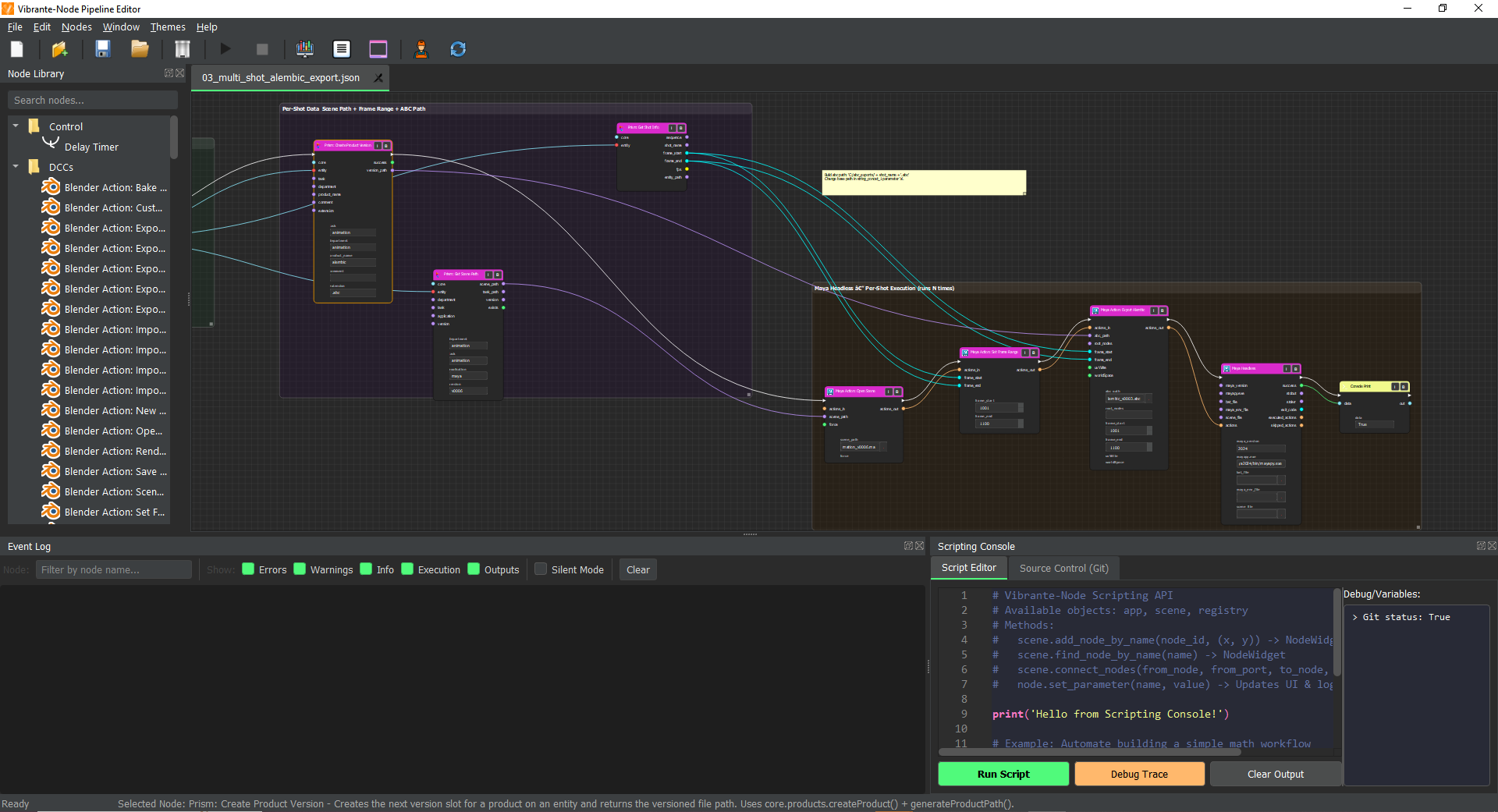
Visual node canvas with exec pins and data wires
Node CanvasWorks With Your Entire Pipeline
Every major VFX DCC and pipeline tool — connected, automated, and running from a single visual workflow.
Houdini
Live BridgeLive TCP JSON-RPC bridge to running Houdini session. Create nodes, set parms, cook, save .hip — all in real-time.
Maya
HeadlessHeadless action-list pattern using mayapy subprocess. Build full render + publish pipelines without opening the UI.
Blender
HeadlessHeadless action-list pattern via Blender background subprocess. Automate modeling, rendering, and export tasks.
Prism Pipeline
60+ nodes60+ nodes covering the full Prism API. Assets, shots, versions, publishing, USD, and more — all visual.
Deadline
Render FarmSubmit render jobs for Maya, Houdini, and Blender directly from your workflow. Track status and collect results.
Python / USD
ExtensibleDrop any Python class in nodes/ and it is live. Full asyncio support. USD workflows via Prism USD integration nodes.
One Platform. Any Workflow.
From AI agents to VFX pipelines — see what real automation looks like when you build it visually.
AI Agent Orchestration
Chain LLM calls, parse structured responses, route on outcome, and execute Python — all without glue code. Build multi-step AI agents visually.
What this builds
- AI chat pipelines
- Content generation systems
- Data enrichment
- Automated research loops
Tech Stack
A general-purpose intelligent workflow orchestration platform
Not a Diagram. An Orchestration Runtime.
Under every workflow is a real async execution engine — topological sort, Qt signal bus, dynamic node registry, and portable JSON persistence.
The engine runs inside qasync so Houdini cooks, HTTP calls, and file I/O never block the UI thread.
Every execution event is broadcast as a Qt signal. Connect any listener — UI panels, loggers, external tools — without modifying engine code.
Any Python class that follows the BaseNode contract becomes a first-class node. No framework hooks, no decorators — just a class and a JSON file.
Entire graphs serialize to portable JSON. Any workflow saved on one machine runs identically on another — no paths hardcoded, no runtime state leaked.
{
  "version": "2.0",
  "nodes": [
    {
      "id": "uuid-...",
      "node_class": "python_script",
      "position": [240, 180],
      "parameters": { "code": "..." }
    }
  ],
  "connections": [
    {
      "from_node": "uuid-...",
      "from_port": "exec_out",
      "to_node":   "uuid-...",
      "to_port":   "exec_in"
    }
  ]
}
Execution domains supported by the runtime
Build Nodes in Minutes
Any Python class that inherits BaseNode becomes a live node. The JSON format is simple enough to write by hand — or use the Node Builder GUI.
1from src.nodes.base import BaseNode23class My_Node(BaseNode):4 name = "my_node"56 def __init__(self):7 super().__init__()8 # [AUTO-GENERATED-PORTS-START]9 self.add_input("file_path", "string", widget_type="text")10 self.add_input("scale", "float", widget_type="float", default=1.0)11 self.add_output("result", "any")12 # [AUTO-GENERATED-PORTS-END]1314 async def execute(self, inputs):15 path = inputs.get("file_path", "")16 scale = inputs.get("scale", 1.0)17 # ... your logic here ...18 return {"result": path, "exec_out": True}1920def register_node():21 return My_Node
1{2 "node_id": "my_node",3 "name": "my_node",4 "description": "My custom node",5 "category": "Custom",6 "use_exec": true,7 "inputs": [8 { "name": "file_path", "type": "string",9 "widget_type": "text" },10 { "name": "scale", "type": "float",11 "widget_type": "float", "default": 1.0 }12 ],13 "outputs": [14 { "name": "result", "type": "any" }15 ],16 "python_code": "..."17}
Drop the JSON file in nodes/
It appears in the library instantly. No restart required — use Scripts → Refresh to reload all nodes without closing the app.
Drop-in nodes
Place any .json file in nodes/ folder — it registers automatically on the next startup or script refresh.
Async first
Every execute() is async. Run Houdini cooks, HTTP calls, file I/O — all without blocking the UI.
Type-safe ports
String, float, int, bool, list, any. The engine validates connections and shows type-colored pins.
Node Builder GUI
Press Ctrl+E to open the visual Node Builder. Build nodes without touching JSON — code is generated for you.
Port Type Colors
Build On It. Extend It. Share It.
Vibrante-Node is a foundation — for node packs, workflow libraries, custom integrations, and tools you haven't built yet.
Universal Integration Surface
Connect to any system in your stack. The runtime doesn't care what you're integrating — if Python can reach it, a node can wrap it.
“If it has a Python library, it has a Vibrante-Node integration.”
View the full SDK referenceEvery workflow serializes to a .vnw JSON file. Open it on any machine, in any project — no runtime dependencies, no path bindings.
- .vnw JSON format
- Platform independent
- Version-control friendly
- Reproducible execution
One Python class + one JSON file = one new node type. The registry auto-discovers everything in nodes/ and any path registered via v_nodes_dir.
- Zero-friction SDK
- Hot-reload support
- Type-safe port API
- Custom widget types
The same async engine, Qt signal bus, and BaseNode API used internally is fully available to external developers building on top.
- Full Python API
- Signal bus access
- Headless execution
- Runtime hook support
Every workflow becomes a shareable template. Every node you create is a contribution to the ecosystem.
The platform is designed to grow — through community packs, shared workflows, and integrations built by developers who know their domain better than we do.
From Zero to Running Workflow
Real examples from the project — open any workflow, execute it, then build your own in minutes.
Install
Clone the repo. Run pip install -r requirements.txt. No build step needed.
Open workflow
File → Open and pick any .json from workflows/ or vfx_workflows/.
Execute
Press Run ( from toolbar). Watch nodes light up in execution order.
Modify nodes
Ctrl+E on any node to edit parameters live. Re-run instantly.
Build your own
Press Ctrl+N to open the Node Builder GUI and author your first custom node.
Example Explorer
11 workflowsResolve project → get shot info → set frame range (1001–1100, 24 fps) → submit batch to Deadline farm.
Look up asset in Prism → open Maya scene headlessly → export geometry → register published version.
Iterate over shots in seq_0001, cook Houdini geometry per shot, export Alembic caches.
Init core → create project → create asset entity → build scene from preset. Full pipeline bootstrap.
Scripting console: loop over all scene nodes and prepend a prefix string to every node name.
One-click git.status() + git.commit() from the Scripting Console — automated project snapshots.
Retry a random float check until threshold met — the canonical while-loop retry pattern.
Iterate character-by-character over "VIBRANTE" — live example of the For Each loop node.
Squares a float input. Live-reactive via on_parameter_changed — updates output as you type.
Filter a list by string pattern match — a drop-in reusable node for any data pipeline.
Non-blocking asyncio.sleep delay — the UI stays responsive while the node waits.
Real Code Examples
examples/nodes/1from src.nodes.base import BaseNode23class MathSquareNode(BaseNode):4 name = "Math Square"5 category = "Math"6 description = "Calculates the square of the input value."78 def __init__(self):9 super().__init__(use_exec=False)10 # [AUTO-GENERATED-PORTS-START]11 self.add_input("value", "float", widget_type="float", default=0.0)12 self.add_output("result", "float")13 # [AUTO-GENERATED-PORTS-END]1415 async def execute(self, inputs):16 val = float(inputs.get("value", 0.0))17 result = val * val18 self.log_info(f"Squaring {val} -> {result}")19 return {"result": result}2021 async def on_parameter_changed(self, name, value):22 if name == "value":23 await self.set_output("result", float(value) ** 2)2425def register_node():26 return MathSquareNode
↳ math_square.py — drop into nodes/ and it appears in the library immediately.
Start Building Your
Pipeline Today
Open source. Python-native. Production ready. No subscriptions. No lock-in. Just nodes.